
A factory-reset phone can become urgent when you are abroad and need maps, banking, transport, or messaging apps. If the setup screen asks for a previously linked account, the safest solution is not an unofficial shortcut. It is to verify ownership, recover the correct account, and rebuild the phone through trusted app sources.
Understand the Account Check
Android device protection is designed to stop a lost or stolen phone from being reused after a reset. Depending on the Huawei model and software history, setup may request the Google account previously synced to the device, a HUAWEI ID, or the screen-lock details used before the reset.
Searches for bypass google account huawei often lead to tools that promise instant access. These methods can expose passwords, install modified software, damage the phone, or leave it unable to receive updates. They may also remove evidence needed by an authorised service centre.
Recover the Account You Own
Start with the email address or phone number previously used on the device. Use Google’s official account-recovery process for a Google account. For a forgotten HUAWEI ID password, Huawei Support directs users to Forgot password in the phone settings or its official account-recovery website.
After changing a password, allow time for security systems to recognise the update before repeatedly attempting setup. Keep the phone connected to a stable private network and use the same device, location, or SIM when possible. If the linked number or email is no longer available, submit the official account appeal rather than creating a new identity for the phone.
Official recovery path: identify the account, verify ownership, and use authorised support.
Use Proof of Ownership When Recovery Fails
If account recovery does not resolve the lock, collect the purchase receipt, IMEI or serial number, and a valid identity document. Contact Huawei Support or an authorised service centre in the country where you are located. A second-hand buyer should also ask the previous owner to remove the device from their account through the official account settings.
Do not pay a remote seller who asks you to disable security, share one-time codes, or connect the phone to an unknown computer. Legitimate support should be able to explain what ownership evidence is required.
Restore Google and Local Apps Safely
Once the phone is legitimately activated, rebuild the app setup in a controlled order. Start with HUAWEI AppGallery, which is Huawei’s official distribution platform, then use verified developer websites or mobile web apps for services unavailable in the local catalogue.
The Huawei Community page linked through bypass google account huawei covers post-setup access to Google apps, rather than removing account protection. Follow that page only after ownership verification is complete. Test essential overseas apps such as banking, transport, delivery, maps, and messaging before relying on them.
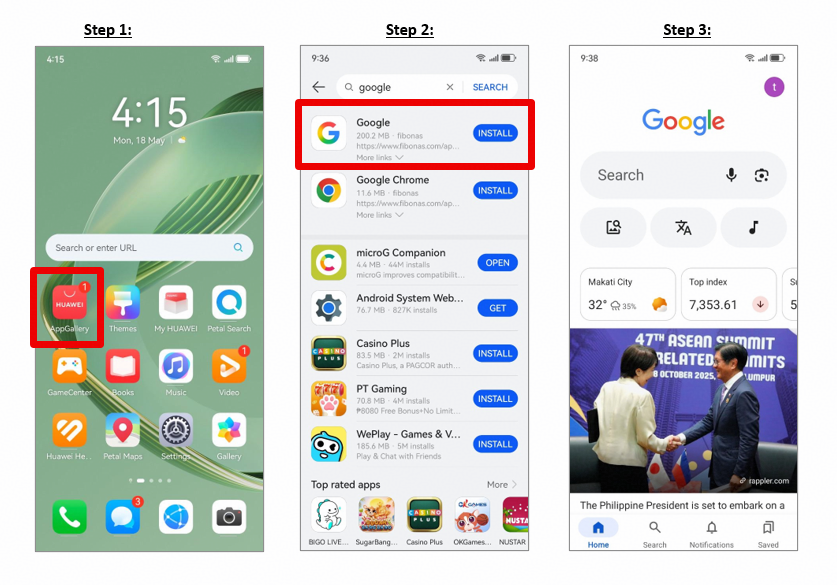
Post-recovery app setup based on the supplied Huawei Community Google-app page.
Keep Future Resets Simple
Before another reset, back up files, confirm recovery email and phone numbers, remove accounts only through system settings, and record the device details. If you plan to sell the phone, sign out and remove your accounts before erasing it.
The bypass google account huawei query should lead responsible owners toward recovery, not a security workaround. Official account recovery, documented ownership, and trusted app installation take longer than a shortcut, but they protect both the phone and the data connected to it.